Wawa
- 3.4
- Rating
- 5.00M
- Installs
- Free
- Price

 Analysis by App-foxy
Ordering food from a convenience store can sound simple until you are trying to do it with one hand, in a noisy parking lot, on a weak connection, or while keeping track of several customizations. I spent time using Wawa as a Food & Drink app, paying particular attention to how comfortably it supports different abilities and everyday situations rather than judging it only by its ordering tools. My overall impression is that it is most useful when you already know what you want from Wawa and want to make the purchase more predictable before arriving.
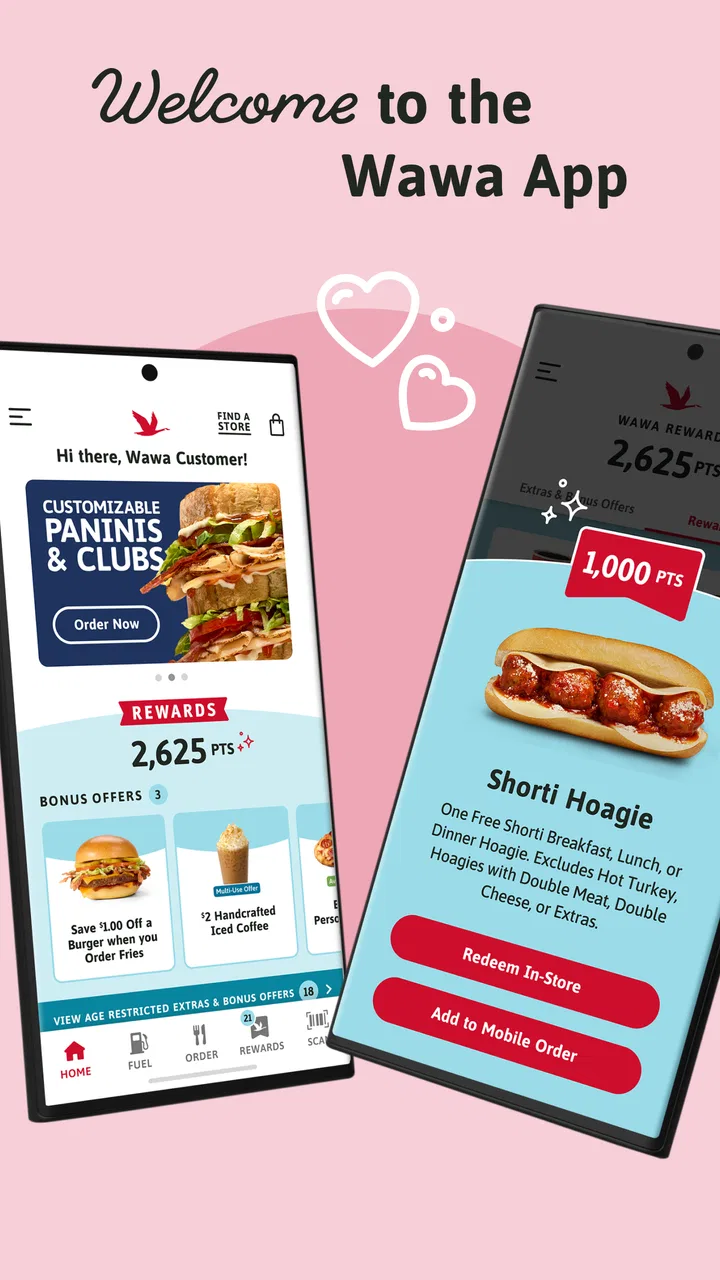
Developed by Wawa, Inc, this free app focuses on ordering, payment, and rewards in one place. It is available for Everyone, runs on Android devices using version 8.0 or later, and the current release is 10.5.0. Its audience is broad, but the experience is not equally convenient for every user. Some people will appreciate reducing time at the counter, while others may find the browsing, customization, or timing steps less comfortable than simply speaking with an employee.
How comfortably Wawa works in different everyday situations
I’ll look at how comfortably the app fits into different routines, from a calm, planned order to a quick stop between obligations. The key is to match the ordering method to the moment: a little preparation can make digital ordering easier, while a rushed or complicated purchase may be better handled another way.
You May Also Like

 Blood Strike: 2.5 Anniversary
Blood Strike’s Loadouts Turn Every Drop Into a Tactical Gamble
A close look at Blood Strike’s custom loadouts: how fast access to signature weapons reshapes its battle royale rhythm, rewards preparation, and narrows the gap between fights.

 Pandora - Music & Podcasts
Pandora’s Music Is Easy to Start, but Harder to Recover
Pandora’s strength is its low-effort path from a seed to a station. Its weak spot is how much confidence it asks you to place in connection, setup, and quiet recovery.

 8 Ball Pool
 Is Built on Rivalries, Rematches, and Routine
A close look at the rivalries, rematches, shared routines, and unanswered safety questions that turn a quick pool match into a persistent mobile community.

 Samsung Music
’s Quiet Strength Is Playing What You Already Own
Its reach comes less from spectacle than from dependable access to a personal library. That simplicity is both the app’s strongest retention engine and its ceiling.

 AccuWeather: Weather Radar
AccuWeather Review: A Quick, Clear Forecast for Everyday Decisions
For everyday plans, the best forecast is the one you can understand quickly. AccuWeather makes rain timing, radar, and local conditions easy to act on, with a few trade-offs.

 Hill Climb Racing
Why Hill Climb Racing Still Turns Crashes Into One More Run
A tiny car, a bumpy hill and one more upgrade: Hill Climb Racing keeps resurfacing because its simple chaos makes every near-miss feel personal.
More From Our News Desk
View All News


Readability and navigation when you are trying to order quickly
The first thing I noticed is that the app makes the most sense when I approach it with a clear plan. If I am deciding between a familiar sandwich, a drink, and a snack, the ordering flow feels more manageable than wandering around a store and building the order mentally. The app’s purpose is easy to understand: choose food, adjust it, select how to pay, and use the available rewards. That direct focus is a real advantage for people who prefer a planned sequence rather than an open-ended shopping trip.
It is less comfortable when I want to browse casually. A convenience-store menu can contain many similar choices, and small differences in ingredients or preparation matter. I found that it helps to pause at each item instead of rapidly tapping through the menu. This is especially important for anyone who has difficulty reading dense screens, processing several choices at once, or remembering what has already been selected. A slower, deliberate approach reduces the chance of adding an unwanted option or missing a customization.
For readability, the practical question is not only whether text can be seen. It is also whether the order summary is easy to understand before payment. I recommend reviewing the complete basket from top to bottom, including modifications, rather than trusting memory. That habit is useful for users with low vision, attention difficulties, or food restrictions because it creates a final checkpoint. It also helps anyone ordering for another person, such as a child, coworker, or family member with a very specific preference.
The app is more approachable for someone who already knows Wawa’s menu than for a first-time visitor who needs extensive explanation. A regular customer can use familiar names and repeat a routine. A new customer may need more time to interpret the choices and decide how much customization is necessary. In that sense, the app supports confidence through repetition, but it does not remove the need to understand the food being ordered.
My most useful navigation tip is to prepare the order mentally before opening the app. Decide the main item, likely changes, drink, and pickup intention first. Then use the app to confirm those decisions instead of making every choice under time pressure. This is a small change, but it makes the interface feel less demanding and can be particularly helpful for people who become overwhelmed by long menus or multiple screens.
Motor and sensory considerations during the ordering process
Mobile ordering can reduce some physical demands. I do not need to stand in a line, speak over a busy counter, or point at a menu while trying to explain a complicated order. For someone who finds verbal communication tiring, stressful, or unreliable, entering the request privately can be a meaningful benefit. It can also help a person who needs extra time to check ingredients or formulate a choice without feeling rushed by the next customer.
At the same time, the app still requires a series of precise touches. Selecting a menu item, changing an option, checking the basket, and completing payment can be difficult for people with tremors, limited dexterity, or fatigue in their hands. I would not describe the experience as hands-free. It is a touch-driven workflow, so the convenience depends on being able to tap small controls accurately and notice when a selection has changed.
That creates an important trade-off. Ordering in advance may be easier than communicating at a counter, but it can be harder than asking an employee to assemble a simple request verbally. Someone with limited hand movement may prefer the physical store if a companion can help with communication or if staff assistance is readily available. The app is not automatically the more accessible choice just because it is digital.
Sensory context matters too. The app can be used away from the bright lights, sounds, smells, and movement of a busy store. I can make decisions in a quiet room and avoid the pressure of choosing while people wait behind me. That is a strong use case for customers who are sensitive to noise, crowds, or visual distractions. It also suits anyone who needs a calm environment to check a food order carefully.
There is a less obvious downside: the app shifts the responsibility for noticing mistakes onto the customer. In person, I can ask a worker to repeat an order or explain an unfamiliar option. On a phone, I have to recognize whether the selected item matches what I intended. Users with cognitive disabilities, memory difficulties, or trouble interpreting menu language may benefit from having a trusted person review the basket before submission. That is not a flaw unique to Wawa, but it is important when digital convenience replaces a conversation.
I also recommend avoiding rushed ordering while walking, driving, or carrying bags. The app is better used while seated and focused. That advice sounds ordinary, but it directly affects motor accuracy and sensory comfort. A stable position, a clean screen, and enough time to review the order can make the difference between a smooth purchase and an avoidable correction at pickup.
Situational access: when the app is genuinely useful
The strongest everyday scenario for me is a planned stop during a busy day. Imagine leaving work with only a short break, knowing exactly what you want, but not wanting to wait while the store prepares it. I can place the order before leaving, review the payment step, and arrive with the aim of collecting it rather than making every decision at the counter. For a person with limited stamina, avoiding extra standing and conversation may be more valuable than any reward feature.
It can also help a caregiver ordering for someone else. A parent can check the choices in a quieter setting, confirm the child’s preferred changes, and keep the final order visible for reference. Likewise, a support worker or family member can prepare a familiar meal without requiring the person receiving it to navigate a busy store. The key advantage is not merely speed; it is the ability to separate decision-making from the stressful environment of pickup.
Another useful situation is ordering during a commute, but only when the user is safely stopped and has enough attention available. I would never treat the app as something to operate while driving. For passengers, the benefit may be greater, although a moving vehicle can still make precise tapping and reading harder. If the connection is unstable, waiting until a reliable moment is wiser than repeatedly submitting an order.
The app’s rewards element may appeal to regular Wawa customers who already have a consistent routine. Combining payment and rewards means there is less need to manage separate steps at the register. However, rewards are most helpful when they fit naturally into the way you already shop. I would not make a special trip or choose a less suitable meal merely to chase a benefit. For occasional visitors, the simpler advantage may be ordering ahead rather than building a long-term rewards habit.
People with dietary restrictions should treat digital customization as an aid to communication, not as a guarantee that every concern has been resolved. The app can help you state preferences clearly and review the selected order, but I would still ask an employee directly when an ingredient, preparation method, or cross-contact issue is important. A screen cannot replace a conversation when the consequences of misunderstanding are serious.
Compared with ordering at the counter, the app offers privacy, preparation time, and a written order to review. Compared with a general delivery service, its appeal is closer control over the Wawa purchase and a more direct relationship with the store’s own ordering process. The trade-off is that a general service may be more convenient when you cannot travel to the store, while this app is better suited to a planned pickup routine. Neither option is universally superior; the right choice depends on whether your main barrier is communication, travel, waiting, or physical interaction.
Remaining barriers that affect inclusive use
The biggest barrier is the assumption that every user can comfortably read, tap, remember, and confirm several steps on a phone. That assumption leaves out people who rely on a support person, alternative input method, enlarged text, or extra time. I would be cautious about recommending the app as the only ordering route for someone who cannot independently operate a touchscreen or who needs detailed assistance with menu interpretation.
There is also a practical risk in relying too heavily on advance ordering. A user may expect the app to remove all uncertainty from the visit, but the physical pickup still takes place in a real store with its own noise, queues, counters, and movement. Someone who avoids crowded environments may still need a plan for entering, finding the pickup area, or communicating if something is unclear. Ordering ahead can shorten one part of the experience without eliminating every environmental barrier.
Payment is another point where preparation matters. Because the app combines ordering and paying, a person who has difficulty entering information, switching between screens, or recognizing confirmation states may need assistance. I would advise using the app first for a very familiar, low-pressure order rather than testing it for the first time when you are late or already overwhelmed. That initial trial reveals whether the sequence works for your particular motor, visual, and cognitive needs.
The public response is mixed rather than universally enthusiastic: the app holds a 3.5 average from around 39 thousand ratings, with roughly 16 thousand written reviews. I see that as a reason to keep expectations practical. A large user base does not mean every person will find the interface effortless. The app has passed the threshold of being widely used, with over 5 million installs, but popularity should not be confused with personal accessibility.
It is also worth remembering that the app is free, so the main cost is not purchase price but time and attention. If you spend several minutes correcting an order that would have taken a short conversation at the counter, the digital route has not helped. For a user who values complete control and a quiet ordering process, that time may be worthwhile. For someone who finds touchscreens tiring or confusing, the usual in-person alternative may be kinder and faster.
My practical workaround is to create a repeatable routine: order from a seated position, use the same familiar items when possible, review every modification, and keep a trusted person involved when the order has medical, allergy-related, or communication-sensitive details. This does not add new functions to the app, but it makes its existing workflow more dependable. It also prevents the common mistake of treating convenience as a substitute for verification.
Who should use it and who may be better served elsewhere
I would recommend Wawa to regular customers who want a predictable pickup process, prefer typing over speaking, or find busy counters tiring. It is especially suitable for people who can comfortably use a touchscreen and who benefit from making choices in a quiet environment. The combination of ordering, payment, and rewards is sensible for a routine customer who visits often enough to appreciate having those tasks together.
I would be more cautious for users with significant motor limitations, severe visual difficulties, or cognitive challenges that make multi-step confirmation hard. The app may still be useful with a companion, but I would not assume independent use is comfortable for everyone. A direct conversation with store staff, a support person, or another ordering method may be better when the order is complex or the customer needs reassurance.
It is also not the best choice for someone who wants broad restaurant discovery, delivery comparison, or a marketplace view of many food providers. This is a focused Wawa tool, not a general food-ordering directory. Its strength comes from serving one familiar store, so customers who prefer to compare menus, fees, or nearby businesses will likely find a broader alternative more useful.
For occasional visitors, the decision is simple: use it if advance preparation and a written order reduce stress; skip it if installing and learning another app feels like more work than placing the order in person. The fact that it is free removes a financial obstacle, but it does not remove the learning curve. Accessibility includes mental effort, and that effort varies widely from one customer to another.
An inclusive verdict after regular use
My honest view is that Wawa makes the ordering experience more flexible, but not automatically accessible in every context. It gives me a calmer way to choose food, reduces some face-to-face pressure, and can make a planned pickup easier for people with limited stamina or sensory sensitivity. Those are meaningful strengths, particularly when the order is familiar and the user has time to review it.
Its limitations are equally important. The process still depends on accurate touch input, readable menus, sustained attention, and a final check that the digital order matches the intended meal. It does not remove the physical realities of visiting a store, and it should not be treated as a replacement for staff communication when dietary safety or detailed assistance is involved.
After its release on June 21, 2017, the app has become a substantial part of Wawa’s digital ordering experience, and the current 10.5.0 version shows that it remains actively relevant to customers. I would judge it less by its install count and more by whether its workflow matches your needs. If you want a quiet, repeatable way to order and pay for familiar Wawa food, it is worth trying. If your priority is hands-free use, extensive assistance, delivery from many restaurants, or a fully conversation-based experience, the counter or a different service may serve you better.
My recommendation is to start with one simple order in a calm setting. Check how comfortably you can read the choices, make selections, review changes, and complete payment without rushing. If that trial reduces effort rather than adding it, the app can become a useful part of your routine. If it creates more tapping, uncertainty, or fatigue than the store itself, choosing another route is not a failure; it is the more inclusive decision for you.
FAQs for Wawa
01What is Wawa and what can I do with it?
Wawa is a versatile app designed to provide users with a seamless experience for ordering food, finding nearby stores, and availing various services. With an intuitive interface, it allows you to browse menus, customize orders, and track deliveries in real-time. Whether you're looking for a quick snack or a full meal, Wawa has you covered.
02Is Wawa available on both Android and iOS?
Yes, Wawa is available for download on both Android and iOS devices. You can easily find it on the Google Play Store for Android users and the Apple App Store for iOS users. This cross-platform availability ensures that you can enjoy the app's features regardless of your device type.
03Are there any subscription fees or in-app purchases?
Wawa is free to download and use, but be aware that it may include optional in-app purchases. These purchases can enhance your experience but are not necessary for basic functionality. Additionally, while the app itself is free, purchasing food or services through the app will incur costs based on your order.
04How does Wawa ensure the security of my personal information?
Wawa takes user privacy seriously and employs robust security measures to protect your personal information. The app uses encryption to safeguard data transmission and complies with industry standards for data protection. It is always advisable to review their privacy policy for detailed information on how your data is handled.
05Can I use Wawa in multiple locations, or is it limited to specific areas?
Wawa is expanding its reach, but its availability may vary depending on your location. It primarily operates in regions where Wawa stores and services are present. Before downloading, check the app's coverage in your area to ensure you can take full advantage of its features.
Pros
- User-friendly interface enhances navigation.
- Extensive library of local music available.
- Offline mode for data saving and convenience.
- High-quality audio streaming for a great experience.
- Frequent updates with new features and fixes.
Cons
- Limited international music selection.
- Ads can be intrusive without a premium plan.
- Requires significant storage space.
- Some features locked behind paywall.
- Occasional connectivity issues reported.

Wawa
Gallery